Call: 1-519-670-8000
Business Hours: Mon - Fri 7:30AM-5:00PM EST

Products

E-RANGE

E-Range is a way of controlling either the CR-2 or the CR-2TL master with a remote device such as a tablet or computer. Unlike other control systems our master controllers have web browsers that the remote devices can access.

So even if the remote device does an update it will make no difference as the remote device is accessing a web browser in the master screen not running a program to access the screen.

The CR2 platform control system is powered by an industry leader in industrial automation.

Robust and reliability are the 2 main features required in any control system. We believe we have this and stand by this with a 3 year warranty.

This industry is one of the harshest environments for any control system, in particularly the target control screen mounted in the stall or booth. Not only does the screen have to handle lead dust and airborne chemicals, but also more importantly the sound repercussion or sonic boom when a shot is fired. Commercially available hand held devices like tables were not made for this and do not last long in this environment. Although tablet devices are usually cheaper than an industrial control screen, having to replace them a couple of times a year soon adds up.

The reliability of these devices is also an issue. Having to press a button 3 or 4 times on a cell phone or tablet may be acceptable for some applications, on a target control system it is not. Using an industrial screen with an industrial processor ensures every time a button is pressed the target will react.

Tablet device are, susceptible to updates. Some updates can affect and even wipe out 3rd party software. This could prove very costly with lane down time and tech visits….

Master Controls

CR-2 System.

Cable driven target system with AR500 ballistic front plate angled to deflect any round that should hit it.

Max track distance to date 113 yards!

White LED target carrier light (optional)

Easy to use control system.

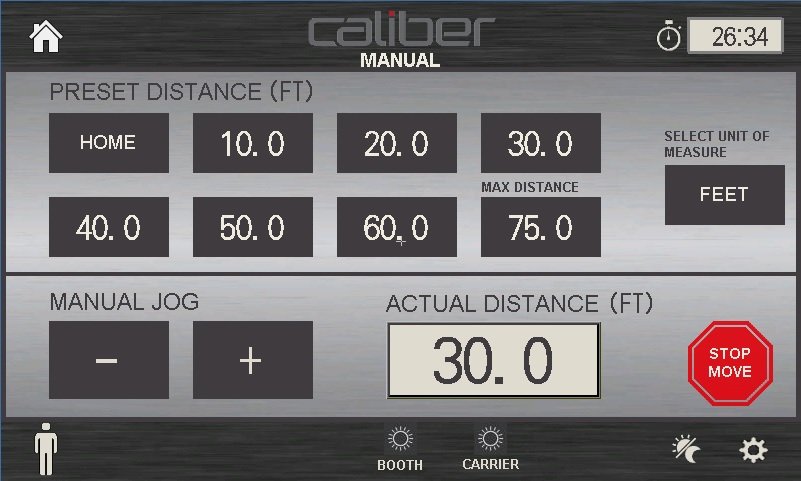
One touch to move the target carrier.

6 programmable pre-set positions including “Home” and “Maximum Distance”.

-/+ Jog buttons for shooters to move the target to any position.

Assistance/ Help button to alert an RSO of an issue in the lane without the shooter having to leave the booth.

Booth and target lighting control (Optional)

Time lane management. (Optional) Showing the shooter how much time is left, with 3 warnings at 5 mins, 2 mins and 10 seconds. Before the lane shuts down and return the target to the home position.

Pictures….

CR-2TL System.

Cable driven target system with AR500 ballistic front plates angled to deflect any round that should hit it.

No down rigger with target clamp to damage.

Target rotation 360° for shoot no shoot decision training.

Randomized edging to stop shooter anticipation.

4 Levels of white LED light and 4 strobe LED patterns.

20 default training scenarios

Integrates with other range equipment and some 3rd party equipment, HVAC, range lighting, audio, intercom, range safety lights and other safety equipment can all be integrated to give a “Total Automated Range Integrated Solution”

Control includes:

  • Basic Control
  • Manual Control
  • Time Drill
  • Random Drill
  • Scenario

Assistance/ Help button to alert an RSO of an issue in the lane without the shooter having to leave the booth.

Time lane management. (Optional) Showing the shooter how much time is left, with 3 warnings at 5 mins, 2 mins and 10 seconds. Before the lane shuts down and return the target to the home position.

Pictures….

(Additional Info)

Basic Control –

One touch to move the target carrier.

6 programmable pre-set positions including “Home” and “Maximum Distance”.

-/+ Jog buttons for shooters to move the target to any position.

Manual Control –

Press the numeric displays to enter the distance and time required to move and turn the target.

Time Drill –

Press the numeric displays to enter the distance and time required to move and turn the target.

When the start button is pressed the target will move to the required position and perform the requested drill, and will return to the home position when the drill is complete.

Random Drill –

Press the “short/ long” push button to select the target to move to a random position. Press the numeric display to enter the time required to turn the target. The target will turn to a shoot or no shoot position randomly.

When the start button is pressed, the target will move to an unknown position and each target exposure is random.

When the drill is complete the target return to the home position.

Scenario –

There are 20 default training scenarios. Each of the default training scenarios has a brief description of the objective, type of target to use and the number of shots to shoot every time the target exposes.

Assistance/ Help button to alert an RSO of an issue in the lane without the shooter having to leave the booth.

Time lane management. (Optional) Showing the shooter how much time is left, with 3 warnings at 5 mins, 2 mins and 10 seconds. Before the lane shuts down and return the target to the home position.

Pictures….

CR-2 Master Control

The CR2 master control is an easy to use control system with intuitive screen navigation and can control up to 20 target lanes.

The main menu screen is password protected to restrict access to only authorized personnel from the welcome screen.

From the “Main Menu” screen the operator can navigate to the “Manual” and “Booth Control” screens.

Control includes:

  • Manual
  • Booth Control

(Additional Info)

Manual –

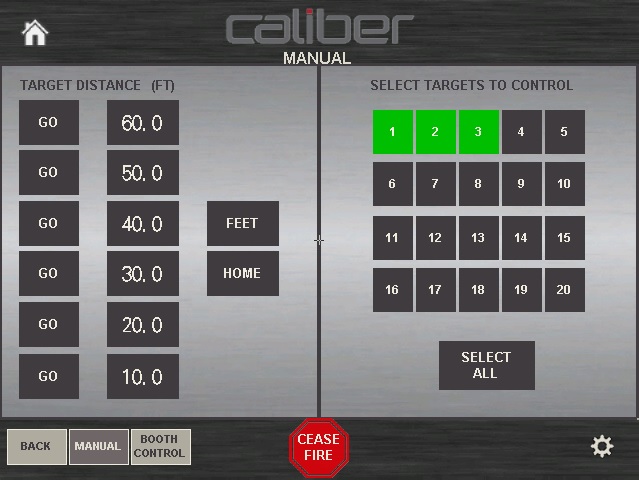
The manual screen can control all or any of the lanes, by selecting the lanes from the list on the right hand side of the screen.

Press the “GO” button next to the required distance, and the selected lanes will travel to that distance.

Booth Control –

The booth control screen enables and disables the booth control screens. This screen also contains the lane time management.

CR-2TL Master Control

The CR2TL master control is an easy to use control system with intuitive screen navigation and can control up to 40 target lanes.

The main menu screen is password protected to restrict access to only authorized personnel from the welcome screen.

Control includes:

  • Manual
  • Auto
  • Program Scenarios
  • Booth Control
  • Lighting

(Additional Info)

Manual –

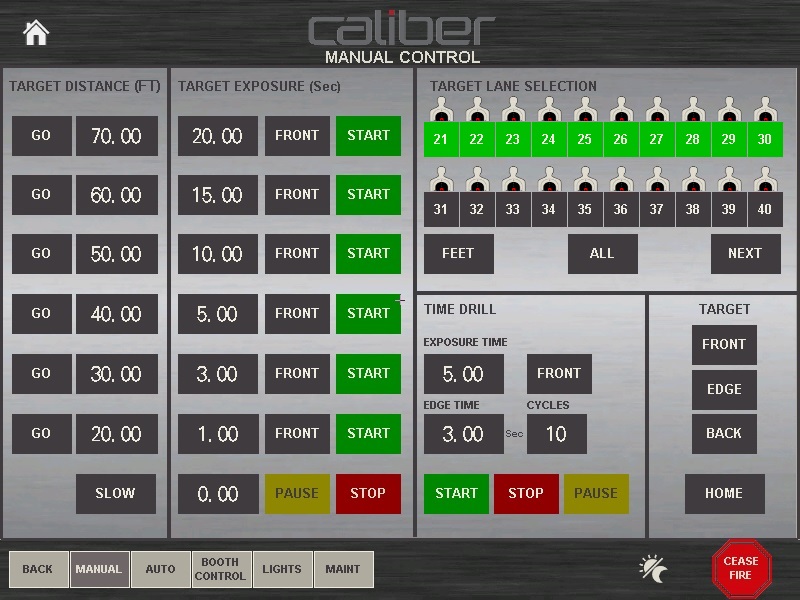
The manual screen can control all or any of the lanes, by pressing the lane numbers to select the lanes.

Press the “GO” button next to the required distance, and the selected lanes will travel to that distance.

Auto –

The auto screen control the automatic sequences. The master control can run Time Drills, Random Drills or Training Scenarios from this screen on the lanes selected

Program Scenarios –

Within this screen customized training scenarios can be written and stored. The system can store up to 100 training scenarios each 30 steps long. Each step is made up of 2 parts, target distance and time drill. The training scenario also has the ability to have random distances and exposures. No program will run the same with the random selected.

Booth Control –

The booth control screen enables and disables the booth control screens. This screen also contains the lane time management. The local control screens can be manipulated to not allow the shooter to turn the target.

Lighting –

The lighting screen enables the target lights and booth light (option) and can change the 4 white light levels

High/ Medium/ Low/ Shot and 4 strobe patterns Red/ Blue, Red/ White, Red/ White/ Blue and Blue.